What to wear tomorrow? Check before bed
Outfit advice for tomorrow, yesterday comparison, and a 9 PM nightly reminder. A daily companion for commuters.


Why Weather Assistant?
Built for Taiwan commuters
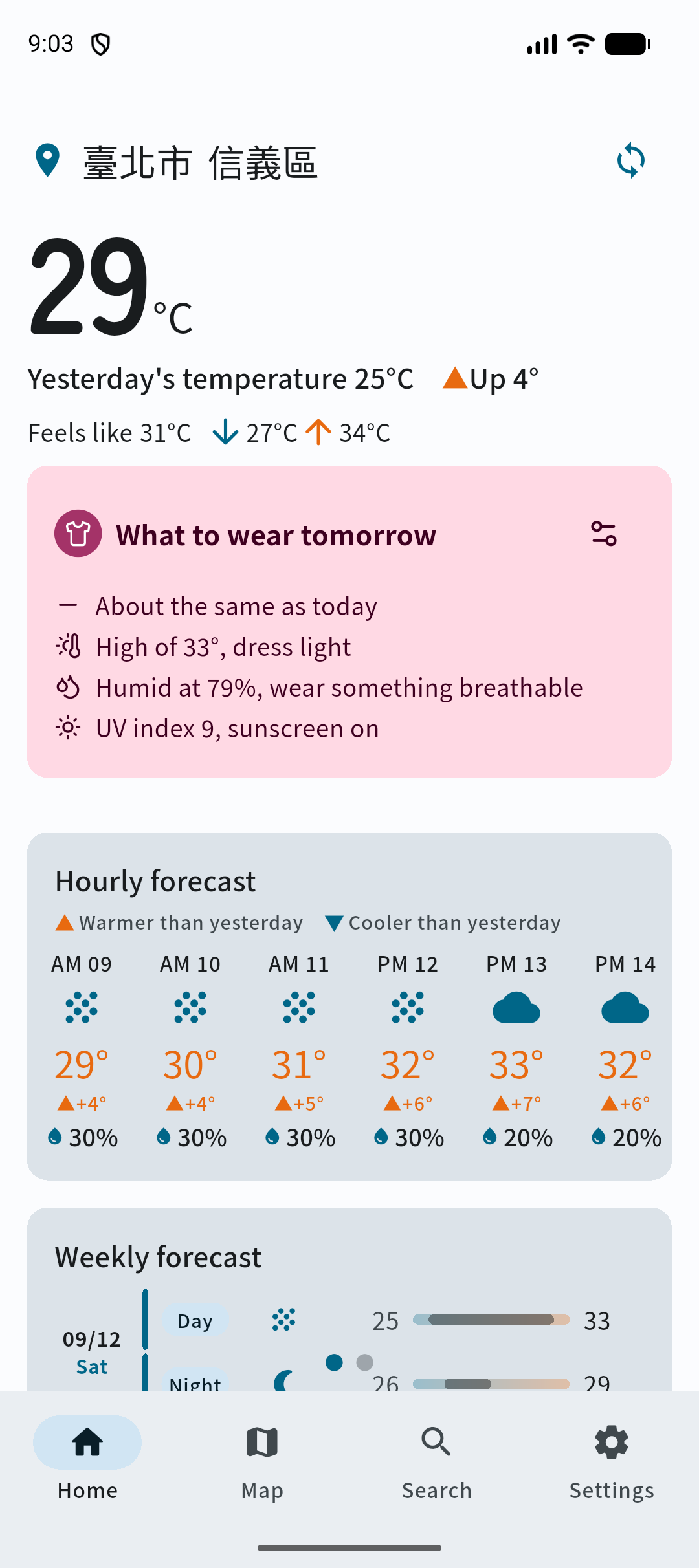
Outfit advice for tomorrow
Five conservative, practical rules based on tomorrow's forecast vs. today: jacket reminders when it cools down, heat alerts, layering tips for big day-night gaps.
Nightly 9 PM local reminder
One bedtime nudge telling you what to wear tomorrow. Fully local scheduling with zero backend — cached forecasts still notify in airplane mode, and tapping returns to the right location.
Full forecast at a glance
Hourly temperature, daily forecast, humidity, wind speed and direction, UV index, WBGT heat hazard, and sunrise/sunset — all on one page.
Air quality + earthquake lite
AQI, the official weather helper text, plus a home banner for significant earthquakes and a felt-earthquake list — disaster awareness for commuters.
Multiple locations + map picking
Save multiple locations and swipe between them, search by text or pick on the map, with automatic township lookup and graceful location-permission handling.
Themes, scaling, 5 languages
Light/dark themes, font scaling, and five languages in a cute yet refined interface you'll enjoy opening every day.
Data Sources
Open data and trusted services, clearly attributed
Central Weather Administration (CWA)
3-day/weekly township forecasts, WBGT, sunrise/sunset, weather helper text, and AQI all come from CWA open data.
OpenStreetMap
Place search autocomplete uses OSM Nominatim, limited to Taiwan.
NLSC Mapping Center
Coordinate-to-township lookup uses NLSC map data, with a warning when out of range.
Firebase (Google)
Anonymous sign-in, analytics, and crash reporting improve the service without personal tracking.
Frequently Asked Questions
Yes, completely free! All features — outfit advice, forecasts, notifications, and maps — are free, with only AdMob ads.
Five languages: Traditional Chinese, Simplified Chinese, English, Japanese, and Korean. Switch anytime in settings.
An internet connection is needed to refresh forecasts. Notifications use a 7-day local cache, so brief offline periods are fine.
Yes. Toggle the daily outfit notification or change its time (default 9 PM) in settings — no further scheduling once turned off.
No. Add places manually or pick them on the map; location is only a shortcut to find where you are now.
Data comes from CWA open data and the official weather helper text. Historical township comparison depends on station coverage — use it as a daily dressing reference.
About Weather Assistant
No more morning dilemma about what to wear. One glance at the outfit advice before bed — umbrella, jacket — sorted in a sentence.
Download Now